
When Asus first launched its ROG Ally gaming handled, it was instantly dubbed a Steam Deck killer. While it’s not without certain quirks, this label makes a lot of sense if you’re only comparing these two portable PCs from a performance standpoint. The Ryzen Z1 Extreme chip gave the Asus ROG Ally an edge over Valve’s Steam Deck. But what about the Z1 version?
The Ryzen Z1 model of the Asus ROG Ally is cheaper, but for the most part, it’s the same as the most expensive counterpart — except, of course, the processor. How do these two handhelds compare, and is the Z1 worth buying? We’ve tested both and we’re here to share the answers with you.
Pricing and availability
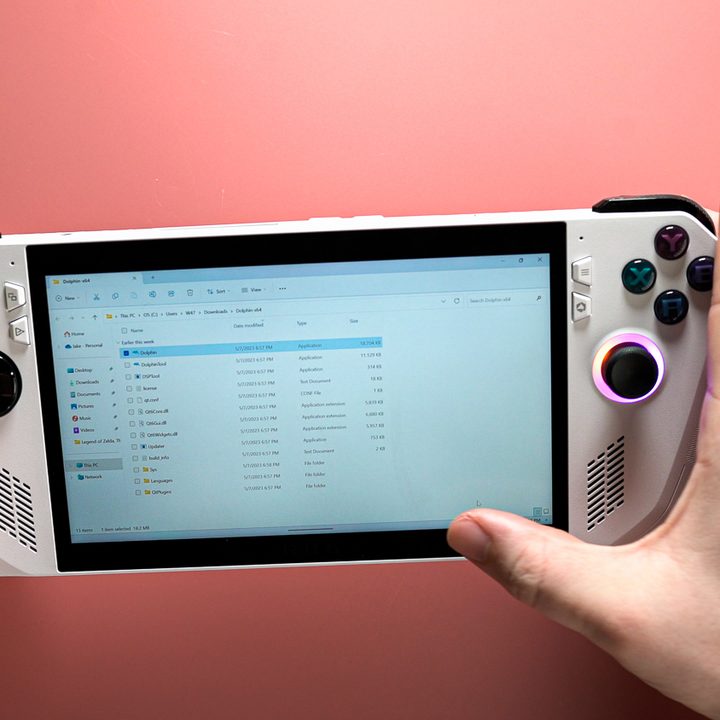
Asus made it clear from the get-go that there’d be two versions of the ROG Ally, but initially, we only got the Ryzen Z1 Extreme model. It launched on June 13, 2023, and was priced at $700. It’s still available at that price, be it from Asus’ own online store or from Best Buy .
The less powerful console of the two arrived on September 18, 2023, with a Ryzen Z1 chip inside. While this version is indeed cheaper, it’s not by a massive amount. You’re saving $100 by picking the Z1 ROG Ally, which is $50 cheaper than the top version of the Steam Deck.
Design
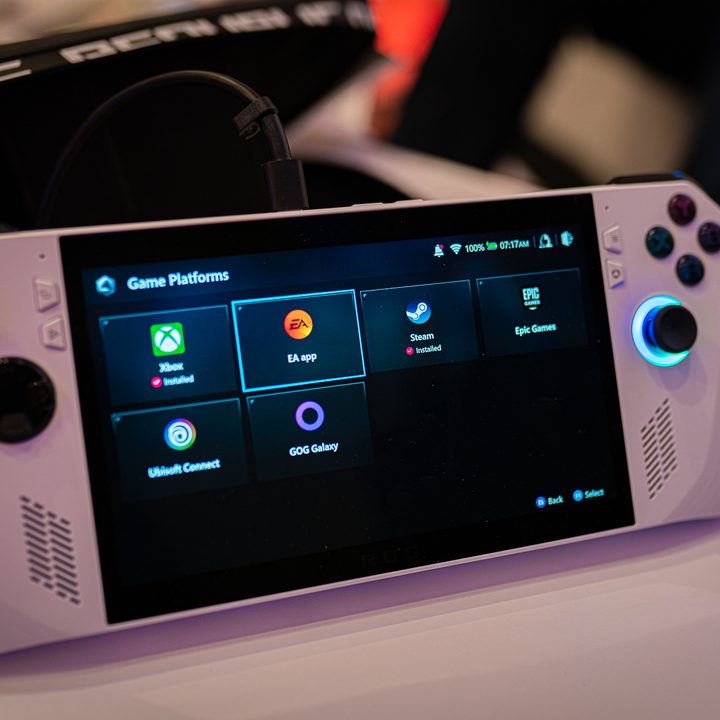
In terms of design, the two consoles are exactly the same. They weigh 1.34 pounds (608 grams) and measure 11.04 x 4.38 x 0.84 inches. Available only in white, the consoles add a small amount of RGB lighting beneath the joysticks, but otherwise have a fairly muted, albeit sharp design.
Unlike the recent Lenovo Legion Go or the Nintendo Switch, the ROG Ally doesn’t come with detachable controllers, and unlike the Steam Deck, it doesn’t feature a trackpad despite being a Windows 11-powered device. It’s still easy enough to navigate thanks to the wide range of controls, though, and there’s a touchscreen too.
As far as the button layout goes, if you’ve ever held an Xbox controller, you’ll have an easy time getting used to the ROG Ally with its ABXY format. Besides that, there are two joysticks on each side, with the D-pad on the left side, and standard shoulder and trigger buttons. Asus also adds two assignable grip buttons at the back, and there are a few useful buttons at the front that aren’t used in gaming, but ar, instead meant to help you interact with the device.
One of the areas where the Asus ROG Ally truly shines is the display, and that has stayed the same across both versions (along with virtually everything else except the chip inside of the console). The handheld is equipped with a 7-inch display that sports a maximum resolution of 1,920 x 1,080, but you can also choose to play at 720p to save battery or boost the performance a little bit. It’s shockingly bright for something so small, reaching up to 500 nits peak brightness, and supports variable refresh rates ranging from 48Hz to 120Hz.
On the outside, both the Ryzen Z1 and the Z1 Extreme models are one and the same, but on the inside, they couldn’t be more different.
Performance

When the Asus ROG Ally Z1 Extreme first launched, it immediately impressed with its superb performance. The Z1 Extreme APU blew the Steam Deck out of the water, and although the ROG Ally is not without some problems, it’s a better console on paper. However, we’ve always had a bad feeling about the Z1 ROG Ally, and in-depth testing has proven that we were right.
The two chips, while close in name, are very, very far apart in terms of how capable they are. This is a problem in some games and acceptable in others, but one thing is certain — playing the most demanding AAA titles on a Z1 ROG Ally is going to be challenging at best and impossible at worst. Meanwhile, the Z1 Extreme version fares much better.
It all comes down to how capable the APU is, and the Z1 Extreme has far better specifications than the Z1. While the Ryzen Z1 only comes with six Zen 4 CPU cores, the Z1 Extreme has eight. Two extra cores may not sound like much, but the GPU in the Z1 is significantly weaker, sporting only four RDNA 3 cores as opposed to the Z1 Extreme, which comes with 12.
Let’s see how these two chips compare in various games.
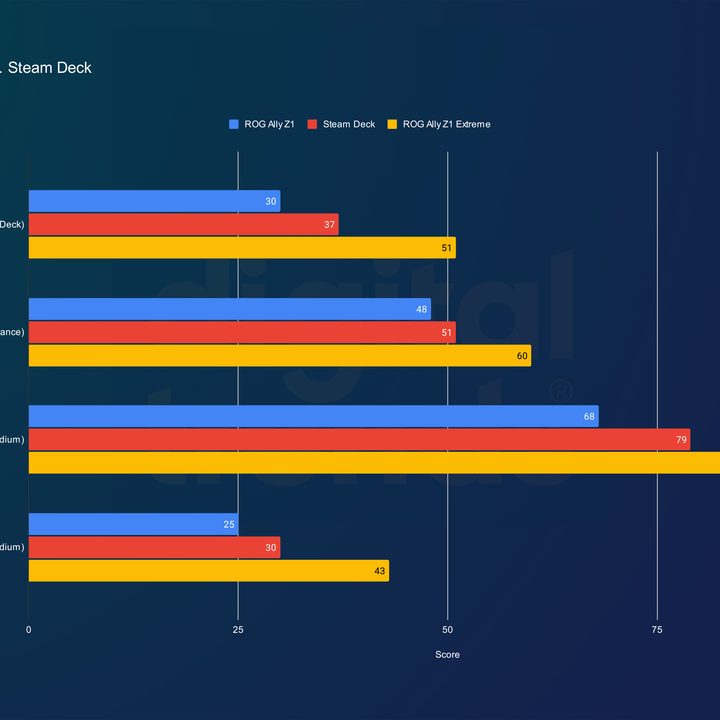
If the Steam Deck falls behind the Asus ROG Ally Z1 Extreme in every test, and the ROG Ally Z1 trails behind the Steam Deck, then let’s be real — it’s not great, and sometimes it marks a difference between smooth performance and being pretty much unplayable.
We’ve tested both consoles at 720p and at a 15-watt power draw, meaning Performance mode. The Z1 model averaged a mere 25 frames per second (fps) in Dying Light 2, and that’s only on medium settings, whereas the Z1 Extreme delivered an acceptable 43 fps. A less demanding game, like Strange Brigade, fared better with 68 fps for the Z1, but the Z1 Extreme still wins by 20 fps, averaging 88 frames per second.
Across our entire test suite, the Z1 is around 13% slower than the Steam Deck, and a whopping 29% slower than its Z1 Extreme-equipped sibling. While the above scores are all on Performance mode, we’ve also taken the Z1 for a spin in all four of its modes, and here are the results.
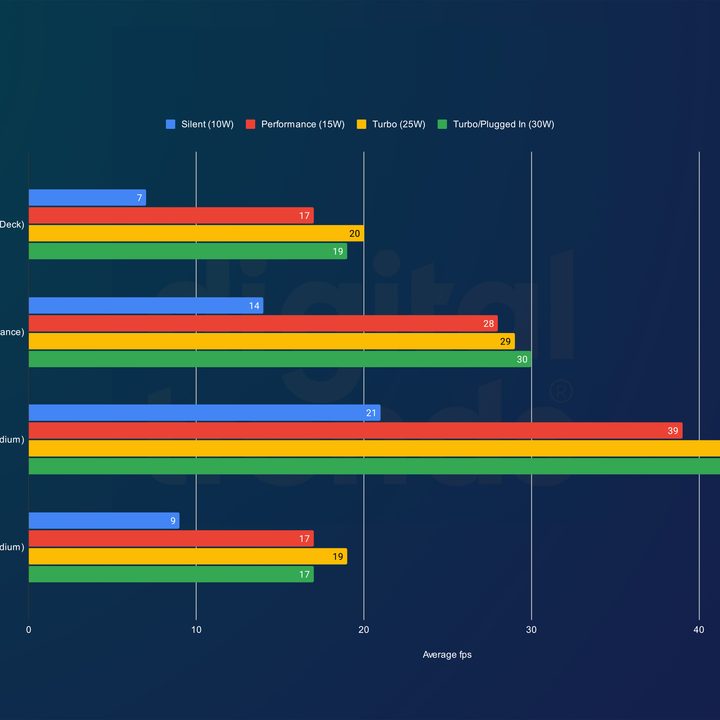
The above scores are at 1080p, and that alone is quite taxing on the Asus ROG Ally Z1. Unsurprisingly, playing on Turbo with the device plugged in gives the best results, although only Strange Brigade and Horizon Zero Dawn are somewhat smooth at that resolution. Then there’s Silent mode, which is almost bound to bring more frustration than entertainment in most titles.

Here’s a similar look at the ROG Ally with the Z1 Extreme APU, although mind the colors, as they’re inverted. At 1080p, the portable PC was able to deliver a decent gaming experience in most titles, although games like Returnal are more of a hassle than others. The gap between plugged-in and unplugged Turbo isn’t significant, but there’s more of a difference in Performance mode frame rates. Silent mode is pretty unplayable here too.
Comparing these two sets of benchmarks tells us that the Z1 Extreme is 32% faster at Turbo (plugged-in) mode; 28% faster at Turbo 25W mode; and 27% faster at Performance mode. On Silent mode, both devices are comparable.
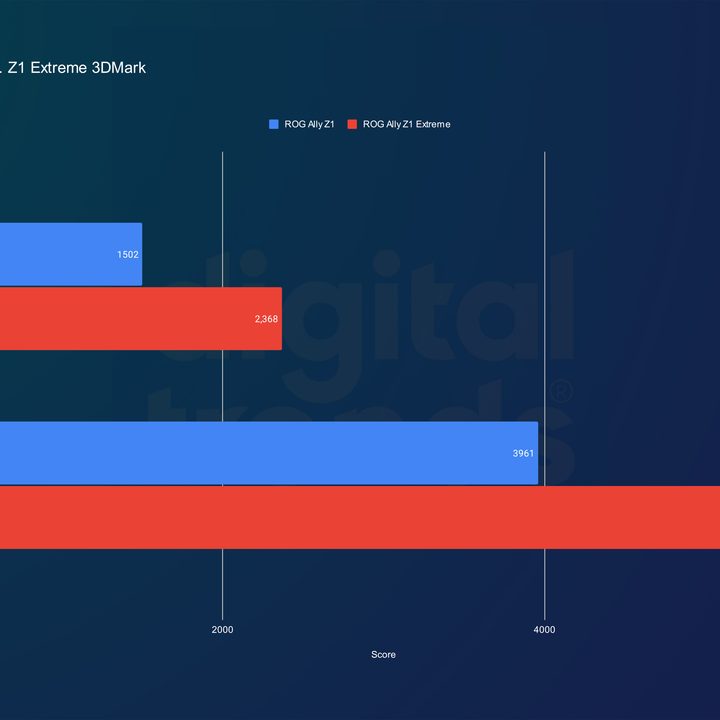
We’ve tested both versions of the ROG Ally in 3DMark Time Spy, and unfortunately, these scores also don’t bode well for the new handheld. At the default Performance mode, the ROG Ally Z1 falls behind the Z1 Extreme by a massive 37%. The Fire Strike test didn’t go much better, with the Z1 chip being up to 30% slower.
All in all, across every single test we’ve run, the Z1 proves to be a significant step down from the Z1 Extreme. While this wasn’t unexpected, it’s still a stark contrast, especially with the Z1 ROG Ally being only $100 cheaper.
No contest

The Asus ROG Ally with the Z1 Extreme chip is a solid gaming console. Not all of its controls are intuitive, and navigating Windows 11 is not quite as seamless as it is on Valve’s SteamOS. However, the extra performance makes up for any quirks, and the beautifully bright screen elevates the experience even further.
While the Asus ROG Ally Z1 has all of the same great qualities, be it the vibrant screen, the robust 512GB of storage, or the access to more games than the Steam Deck can provide, it lags behind in performance, And it lags behind a lot.

Considering that it costs only $50 less than the top version of Steam Deck, and it’s only $100 cheaper than its older sibling with the Z1 Extreme chip, the ROG Ally Z1 simply doesn’t make too much sense. It’s objectively worse than both of those handhelds while providing small savings. Therefore, the verdict is easy this time around.
If you want to enjoy your gaming experience, the Asus ROG Ally Z1 Extreme is a significantly better purchase. It’ll play more games, and it’ll run them smoothly (for the most part). On the Z1 ROG Ally, some games, such as Returnal, wouldn’t even run without tweaking the settings in a major way. Other titles, like Starfield, offered such pitiful frame rates that they were almost unplayable.
In short: Save up the extra $100 and get the better console.