  1. Home
  2. Computing
  3. News

WhatsApp Web finally lets your laptop handle calls instead of forcing you back to your phone

Other new features include Waiting Room, QuickHD, and background Noise Suppression.

Add as a preferred source on Google
Adult, Female, Person
WhatsApp

I’ve lost count of how many times I’ve had to awkwardly grab my phone mid-task just to take a WhatsApp call my laptop couldn’t handle on the web version. Today’s update changes that for good.

So what’s actually rolling out today?

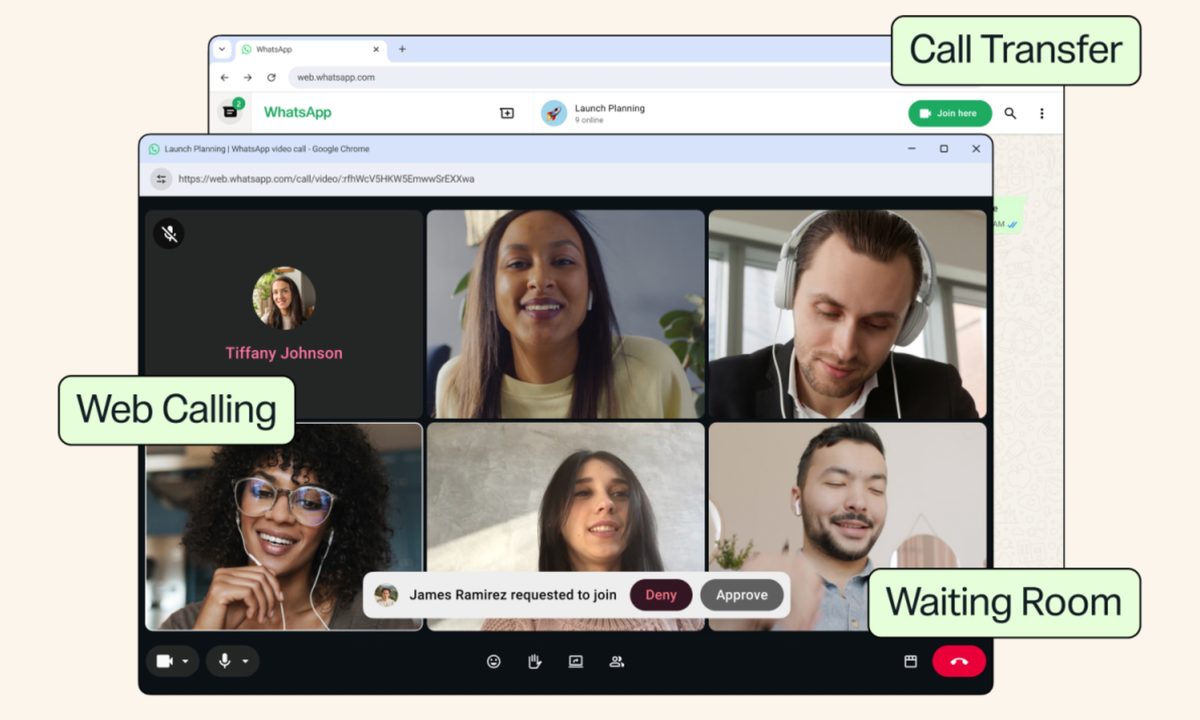
WhatsApp Web is getting voice and video calling, covering both one-on-one and group calls with zero app downloads required (which was the case previously). It’s been in testing for months. The feature extended to group chats back in June. Now it’s rolling out broadly to reach every user. 

We’re introducing new features that make @WhatsApp calls even easier, like calling from WhatsApp Web, call transfer, background noise suppression, and more. https://t.co/4HKD5xjxZb

— Meta Newsroom (@MetaNewsroom) July 28, 2026

Once it hits your account, web calls bring screen sharing, reactions, and a dedicated Calls tab pulling in your full call history and favorites, matching what you already get on mobile. 

Recommended Videos

Every call stays end-to-end encrypted too, with no time limits and no cost, exactly like WhatsApp everywhere else.

What about the extra features WhatsApp mentioned?

Call Transfer is the standout here. It lets you move an active call between your phone and the web or desktop app without hanging up or rejoining. The feature could come in handy if you start a call on the go. Once you’re home, you can switch to a bigger screen.

Waiting Room gives hosts control over who joins a call link, holding participants until approval before letting them in. Another new feature, QuickHD, speeds up how fast video reaches full HD at the start of a call. 

Then there’s a new Noise Suppression toggle that strips out background noise so your voice comes through clearly. All the new additions build on recent additions like Voice Isolation and Wide Spectrum audio controls on iPhone

To me, it looks like WhatsApp is finally treating call quality as a real priority. With Zoom and Google Meet long comfortable in browsers, WhatsApp closing this gap feels overdue more than groundbreaking, but it’s a welcome one regardless.


Shikhar Mehrotra
For more than five years, Shikhar has consistently simplified developments in the field of consumer tech and presented them…
Back-to-school desk upgrade? Start with one of these monitor arms
Whether you're studying, coding, or gaming after class, these are the monitor arms I'd happily recommend.
The Best Monitor Arms for Back-to-School That I'd Actually Recommend - HUANUO FlowLift Dual Monitor Stand

Dorm rooms and study desks have one thing in common: they run out of space fast. Between textbooks, notebooks, keyboards, coffee mugs, and laptop chargers, a monitor's stock stand often ends up taking more room than it should. A good monitor arm instantly frees up valuable desk space while also putting the screen at a much more comfortable height, making long study sessions easier on the neck and shoulders. Whether it's a simple single-monitor setup or a dual-screen workstation, these are the monitor arms I'd actually recommend for Back-to-School.

Amazon Basics Single Computer Monitor Stand

Read more
Researchers have built a tool that can identify the AI used to make a fake video
Every AI video generator leaves behind subtle, distinct patterns, and this new tool learned to read them.
fake-ai-video

AI-generated videos have gotten so realistic that spotting a fake is difficult enough on its own. Figuring out which AI model actually created it is even harder. That's exactly why researchers at UC Riverside built a tool that can do both. It's called SAGA, and it can trace a fake video back to the specific AI model that generated it.

The project was led by UC Riverside doctoral researcher Rohit Kundu and electrical and computer engineering professor Amit K. Roy-Chowdhury, in collaboration with researchers from YouTube and Google DeepMind.

Read more
Tokyo lets AI play matchmaker, and hundreds of couples have already tied the knot
Tokyo's government-built AI matchmaking app has led to 265 marriages so far.
ai-dating-apps-chatting

Government-run dating apps sound like something out of a policy white paper. Tokyo built one anyway, and it's already helping turn AI matches into real marriages (via Tech Xplore).

So how does this app actually work?

Read more