  1. Home
  2. Computing
  3. News

You can now send emails directly from ChatGPT on the web

You can now draft, edit, and send emails directly inside ChatGPT on the web

Add as a preferred source on Google
Person using ChatGPT on a MacBook.
Unsplash

If you have ever drafted an email in ChatGPT and then had to copy it across to Gmail or Outlook to actually send it, you can now skip that extra step.

OpenAI has rolled out the ability to send emails directly from writing blocks in ChatGPT on the web, keeping the whole process inside a single conversation from start to finish.

Draft it. Tweak it. Send it.

You can now send emails directly from writing blocks in ChatGPT on the web, without leaving the conversation. pic.twitter.com/GoQtlSFGFG

— ChatGPT (@ChatGPTapp) June 5, 2026

ChatGPT writing blocks now let you send emails

Writing blocks are a formatting feature that ChatGPT introduced late last year. When you ask ChatGPT to draft an email, instead of returning a plain chat response, it presents your email in a clean, separate block that looks and feels closer to a real email editor.

You can highlight any line and ask for changes, accept or reject suggestions one by one, and edit text directly inside the block without copying anything elsewhere. The latest update takes that one step further by letting you hit send without ever leaving the chat.

Is it safe to send emails through ChatGPT?

Before you go all in on sending emails through ChatGPT, there is one thing to keep in mind. A recent lawsuit filed in California claims OpenAI shared user prompts, chat queries, and identifying information with Google and Meta tracking tools without proper consent. The case alleges that it violated California privacy law and federal wiretap rules. So maybe hold off on drafting anything too sensitive in there.

What else is ChatGPT up to lately?

That said, OpenAI is not slowing down on new features. ChatGPT is getting smarter at remembering things about you by learning from your chat history over time and retaining that information so your conversations feel more personalized.

Recommended Videos

On the productivity side, ChatGPT for Excel and Google Sheets has officially moved out of beta and is now available globally, letting you build workbooks, clean data, and write formulas in plain language without needing to be a spreadsheet expert.

Manisha Priyadarshini
Manisha Priyadarshini is a tech and entertainment writer with over nine years of editorial experience.
iFixit wants to fix your appliances next, and it brought a bigger toolkit
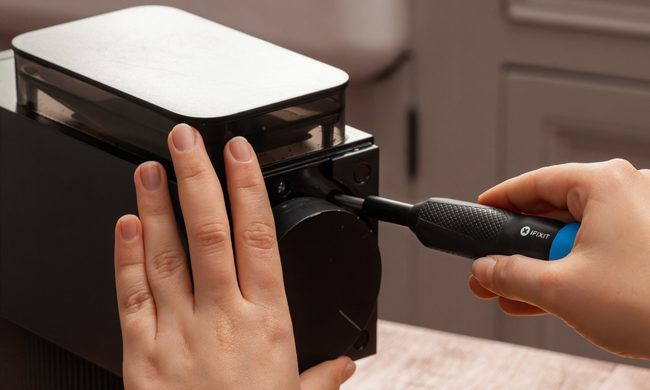
iFixit’s new $35 Megalodon wants to save your appliances from the trash
iFixit Megalodon Driver Kit Featured

iFixit built its reputation by showing people how to fix their phones, consoles, and laptops by themselves. But its next target is larger and probably sitting somewhere in your kitchen or laundry room. The company has launched the Megalodon Driver Kit, which is a $34.95 toolkit designed for appliance repairs, furniture assembly, automotive tinkering, and the countless household jobs.

Picture this, your vacuum cleaner may still work perfectly aside from one loose component buried behind a recessed screw. So rather than replace the whole thing, you can make a quick fix with Megalodon.

Read more
Asus ExpertBook Ultra review: A dreamy ultra-thin machine that surprised me with raw power
If thin and light is what you value the most, this one will serve you perfectly, without the obvious performance compromises.
Asus ExpertBook Ultra laptop

See at Amazon

Quick Review

Read more
I found a free Mac diagnostic app that tells you what Apple’s tools don’t
It can check your Mac’s storage, memory, battery, and network
Techtool Lite UI screenshot

Macs have a strong reputation for being smooth and reliable, and Apple’s tight control over hardware and software is a big reason for that. Use one long enough, however, and you may still run into slowdowns, freezes, strange behavior, or that familiar feeling that something is simply off.

Apple’s own tools can help, but only to a point. Disk Utility is useful for storage-related checks, but it does not give you a wider picture of your Mac’s overall health. I recently came across Techtool Lite, a free diagnostic and maintenance app from Micromat that looks at more than just your drive.

Read more
